
Sarasota County Wanted Notices
Start with one fact. The Sarasota County Sheriff's Office keeps no standing most-wanted page. There is no published count of wanted persons and no update schedule. Instead, SCSO issues individual wanted-person news releases when investigators need public help. A release may carry a photo, identifying details, suspected charges, a case summary, and tip instructions. The Cold Cases and Unsolved Crimes section is a different thing entirely. Never treat it as a warrant roster.
That shapes how a most wanted search works here. No single official page gathers every active warrant in the county. Someone left out of the news stream can still have a warrant for their arrest. A release you saved weeks ago may no longer reflect reality, and search snippets are a particular trap because they can keep an old headline alive after the source page changes. Private reposts add risk by dropping updates altogether.
The smart move is a release-by-release check. Open the live item on the sheriff's own domain. Verify the date. Then read the full text for any language about a change in status. A few visible releases are never the county's complete wanted population. The news stream shows only what investigators chose to publicize, and confirming a current warrant follows a different path entirely.
Sarasota County Wanted Notice Fields
An individual SCSO release is a case-specific notice. It is not a form filled to a template. No standard format exists, so the fields shift from one notice to the next. The one confirmed historical example showed a graphic and alleged charges. It later gained a status update. Read only what the live notice provides.
| Notice element | How to read it |
|---|---|
| Name and photograph | Identity clues that still require careful confirmation |
| Alleged charges | The stated basis for the appeal, not a court disposition |
| Case summary | The agency's account at publication time |
| Published or updated date | A key signal for whether the notice may have changed |
| Tip instructions | The authorized reporting route for that appeal |
Don't expect the same details in every Sarasota wanted release. No standard public field set covers physical descriptions, last-known locations, caution flags, or reward amounts. If a live notice leaves a fact out, let it stay out. Don't pad the gap with private profiles or stale reposts. Accuracy beats uniformity every time.
Sarasota County Notice Versus Warrant
A wanted release and a warrant record play different roles here. The release is a selective public appeal, built around a photo and a short narrative to help identify one person tied to one case. A warrant is a legal case event. SCSO offers no verified public portal listing every county warrant. So an old release proves nothing about current status. Its absence proves nothing about whether a warrant exists at all.
| Record | Purpose | Best current check |
|---|---|---|
| SCSO wanted release | Public help with a selected investigation | Open the live sheriff release and read updates |
| ClerkNet case event | Public court docket activity where available | Inspect the matching case, then confirm |
| Booking result | Current or prior county jail intake | Use SCSO arrest search and verify status |
| Social repost | Rapid distribution of an agency message | Follow it back to the original official page |
A wanted notice, an arrest, and a court case are linked steps. They are not the same record. The sheriff posts the appeal for information. If deputies make an arrest, that event creates a Sarasota County booking in the jail system. The court then runs its own docket, kept separately from both. Each document answers a different question and rests with a different custodian. Read the release for the appeal, check the booking system for jail intake, and turn to ClerkNet for anything filed in court.
Use Sarasota County Wanted Releases
Treat a wanted notice as a live bulletin, not a settled fact. The sheriff can revise the same page after an arrest. Screenshots, social posts, and search results often miss that correction. So rely on the official release. Follow whatever instructions it currently carries.
- Open the notice on the official SCSO domain and confirm the page address.
- Read the original publication date and any update at the top or within the release.
- Compare the name and photograph carefully. Do not identify someone from a loose resemblance.
- Follow only the tip instructions printed in the current official notice.
- Never approach, follow, confront, or post a person's location publicly.
A release may later report an arrest. When that happens, the Sarasota County booking search can show the jail record once the person enters local custody. Court records remain the place to track what happened to the case afterward. And never quote an old wanted page as if it were still active.
Sarasota County Wanted Tip Channels
SCSO wanted appeals point tipsters to two places: official investigators or Sarasota County Crime Stoppers. Which one fits depends on whether you want to speak with law enforcement directly or stay anonymous. Facing immediate danger? Call emergency services. The contacts listed here are for reporting information on an active appeal, not for asking whether a warrant exists.
SCSO Criminal Investigations941-861-4900
Sarasota County Crime Stoppers
941-366-TIPS (8477)
sarasotacrimestoppers.com
SCSO Non-Emergency
941-316-1201
Crime Stoppers is the documented anonymous route. Any reward details, from availability to eligibility rules, must come from Crime Stoppers itself for the specific appeal. Nobody should promise a general reward. Share what you know, let trained personnel weigh it, and steer clear of the subject.
Sarasota Wanted Releases Self-Correct
Sarasota County shows why the live source beats a saved image. One SCSO release first published May 2, 2025 put out a wanted graphic for Trae B. Ward. A week later, on May 9, the sheriff edited the page to report an arrest. The status flipped fast. Anyone relying on a screenshot would still think the search was active. The official SCSO release screenshot captures that lesson. But it is history now, not a current appeal.
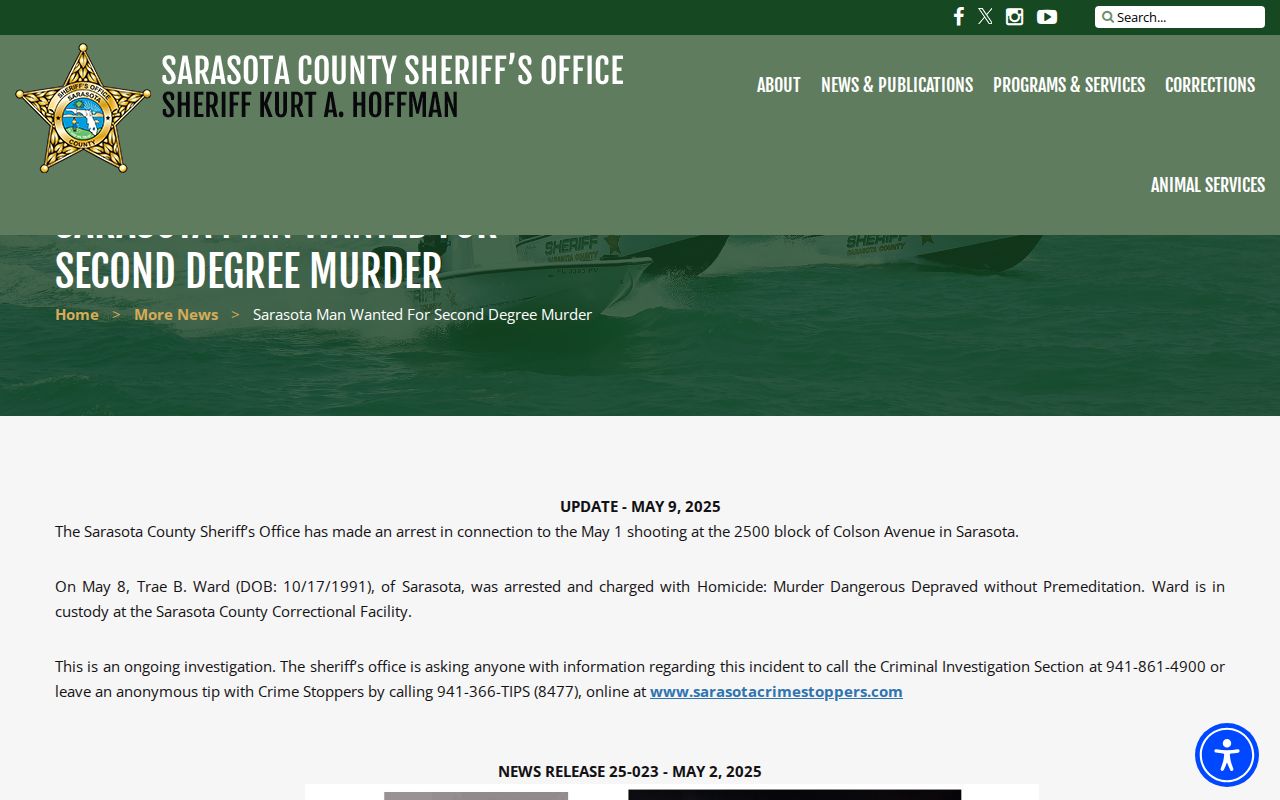
This is why publication and update dates matter. A copied image can linger online for years. The sheriff may have revised the source long ago. Always take the current status from the live SCSO page.
Note: An updated historical wanted release demonstrates process only; it must never be reused to claim that the named person is currently wanted.
Check Sarasota County Warrants
The official SCSO pages show no comprehensive public warrant-search portal. So a wanted release can never substitute for an actual warrant check. The best public starting point is Sarasota ClerkNet. Confirm through the Clerk, counsel, or SCSO. ClerkNet allows searches by defendant name or case number, and its Case Events plus available docket documents may reveal a warrant event.
- Search ClerkNet with the full name or known case number.
- Open the matching case only after checking identity details carefully.
- Review Case Events and available docket documents for a warrant-related entry.
- Confirm the event with the Clerk at 941-861-7400 or through counsel before relying on it.
- For sheriff confirmation, use the SCSO non-emergency line and follow official instructions.
A docket entry beats an old wanted graphic. It can still go stale, though. Warrants get served, recalled, or changed after an event is entered. No Sarasota-specific public table separates warrant types here, so resist attaching type labels or consequences to what you find. The actual case documents and qualified advice control.
Resolve Sarasota County Warrant Questions
Never act on a web result alone if a Sarasota County warrant might affect you. Confirm identity and current status first. An attorney or the court can give case-specific instructions and arrange a safe, lawful response. The sheriff's non-emergency line can point official questions to the right place. But do not show up at an address based only on an online docket or an old news release.
Silence proves nothing either way. The sheriff posts no comprehensive public list. Individual releases exist to seek public help, not to catalog every warrant. Treat every online finding as a lead. Check it against the live case.
Note: Safe resolution means current confirmation and case-specific direction from counsel or the court, never delay, concealment, confrontation, or avoidance tactics.